In a recent post, I wrote about a Jupyter Notebook that I use to automate looking for 404 errors in the docs (and on the website). I have been working to use the same general framework to build additional automations. An easy extension is to look for broken images. Running these every week ensures that the links and images in the docs all work as expected.
What else can I do with the same type of process? In this post, we’ll grade the readability of our docs.
Taking the temperature of your Docs
I’d like to use the same idea of iterating through the sitemap of my docs to understand how they are doing. By measuring a few vitals on each page, I can start to piece together the health of the page.
One test I can run on each page to test the page for readability. A readability score uses heuristics to give you an estimate on the grade level required to read the document. Generally they follow:
6-12: High school reading level
12-16/18 College reading level
18-22 graduate school level
22+ Very advanced.
Most importantly, there are Python libraries that will take text and give it a readability grade.
By running a grade level test across all the pages in the docs, we can get a *very* rough idea on how readable your docs are. Reading scores are based on the length of words and sentences. Prose with short sentences and small words is generally considered easier to read. For that reason, sentences like “Your Kubernetes namespace may contain pods with hundreds of directories” will have a higher score than general writing.
When I run the Flesh_kincade grade metrics across the unskript docs and chart across grade level, I see two distinct peaks:
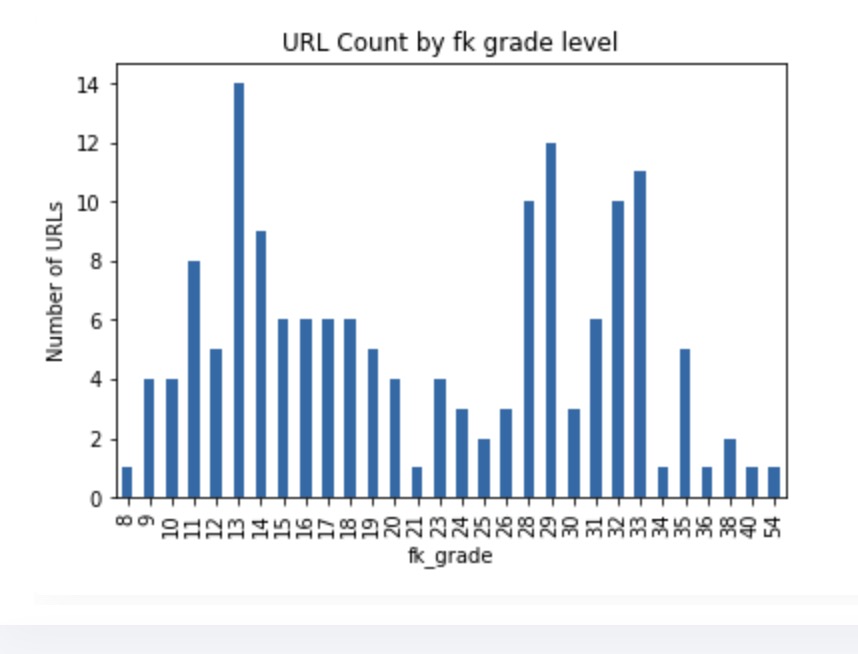
The split is nearly 50:50 at the grade 20 cutoff.
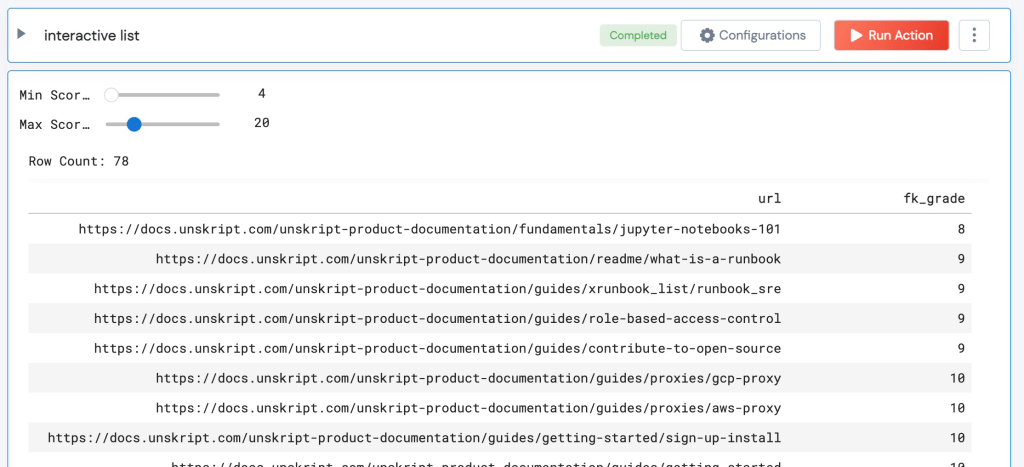
The Runbook also has an interactive table to look at which pages fall into different grade ranges:
Pages with “low” Grade level
When I look at the files <20, they are all documentation pages that have been written by the team that describe issues in prose and with images. These I deem as “generally readable” for a technical audience.
(Of course, we can and will look at the 17-20 grade level docs and see if we can make them easier to read.)
Pages with “high” Grade level
The files that have readability of over 20 are nearly all auto-generated, and fall into 3 categories:
- Connection instructions: These pages have a screenshot of the connection page, followed by a table that describes each entry field, and the value that should be added. There’s no real advantage to adding prose here – these pages “do their job,” despite scoring poorly on this test.
- API reference: Have you ever read API docs? Yeah, they are not renowned for readability. These will just score poorly.
- Action Lists: unSkript has ~500 Drag& Drop actions. To improve visibility of these Actions, we created automated pages that read the name and description of each Action from GitHub. There is a remediation here – we can improve the descriptions in GitHub to improve the readability of these pages.
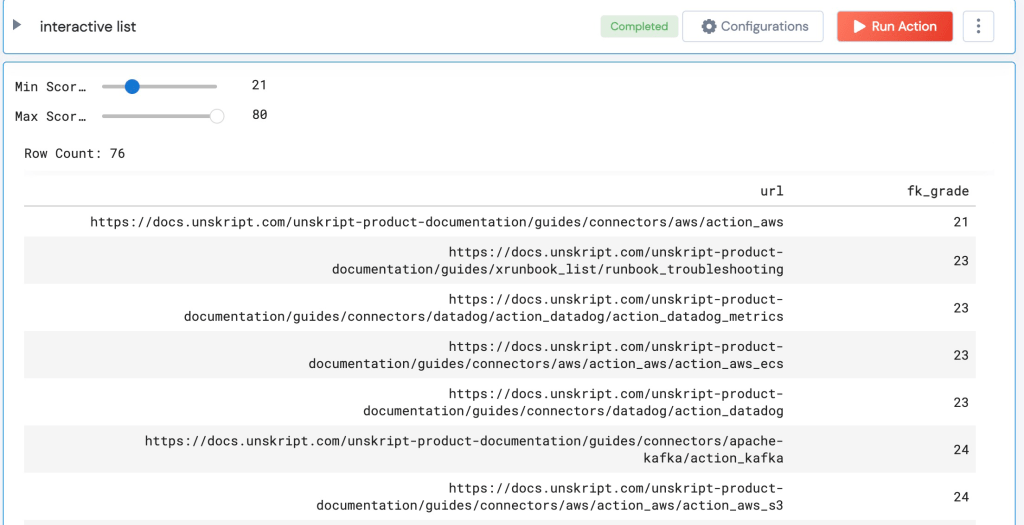
No articles written by the team appear in this high level list!
Readability as Temperature
When a parent places their hand on their child’s forehead – they are doing a quick check. It doesn’t confirm that a child is sick or not, but it can be an indicator. I look at reading level of a document as an indicator- if the score is high, we should look to see why that is the case, and if we can improve on it.
If you’d like to try this Notebook (or any of the others mentioned in this post, I have published them on Github at https://github.com/dougsillars/devrel-automations. Of course, also read go our docs at https://docs.unskript.com – I’d love your feedback!
 SpeakOfTheDevrel.Cloud: Doug Sillars